
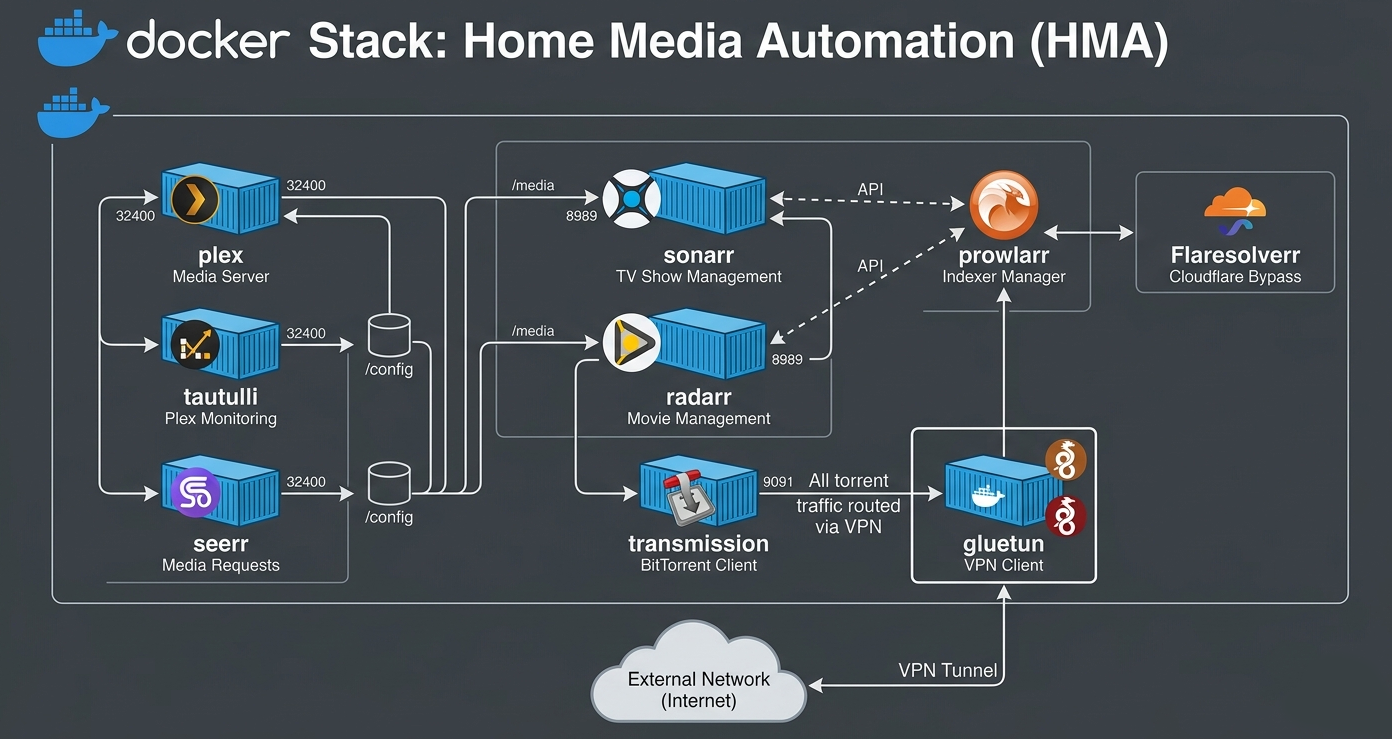

This is a Docker Compose file that defines a container orchestration setup for Plex media server, and automated downloads over VPN with a torrent client. Here’s a breakdown of the different components:
- Plex: Plex is a comprehensive global digital media platform that lets you centralize, organize, and stream your personal media collections alongside a massive library of free, ad-supported commercial content. It functions as a two-sided entertainment ecosystem: it acts as a self-hosted media center for your own files, and a unified gateway to discover movies, live TV channels, and third-party streaming apps.
- Prowlarr:Prowlarr is an open-source indexer manager and proxy built on the popular *arr stack. It acts as a centralized hub to manage both Usenet indexers and Torrent trackers, allowing you to configure them once and automatically sync them to all your other media management applications (like Sonarr, Radarr, and Lidarr).
- Sonarr:Sonarr is a smart PVR (Personal Video Recorder) for BitTorrent and Usenet users. It acts as an automated assistant for your TV shows: you tell it what to watch, and it automatically searches for, downloads, organizes, and upgrades the video files when they become available.
- Radarr: Radarr is an open-source, automated movie collection manager and PVR (Personal Video Recorder) for BitTorrent and Usenet users. You tell it what movies you want, and it automatically searches indexers, sends the download to your client, and organizes the final video file into your media library.
- Tautulli: Tautulli a free, open-source companion application for your Plex Media Server. It acts as a deep analytics, tracking, and monitoring tool, giving you detailed insights into your server’s performance and how your users are streaming your media.
- Seerr:Seerr is a free, open-source media discovery and request management tool designed for self-hosted home media servers. It acts as a user-friendly frontend that integrates with servers like Plex, Jellyfin, and Emby.
- Flaresolverr: FlareSolverr is a proxy server to bypass Cloudflare and DDoS-GUARD protection.
- Transmission: Transmission, a popular torrent client.
- Gluetun: Gluetun, a container that enables transmission and other services to run behind an openVPN tunnel.
Networking
- The network is configured as a macvlan network, which allows multiple virtual networks to be created on a physical interface.
- The eth0 interface is set as the parent of the macvlan network, which means it will be used as the primary network interface for the containers.
- The IP range for the network is defined as 192.168.1.0/25, with an IP address reserved for the gateway (192.168.1.1).
Transmission Gluetun Dependency
- Transmission depends on the gluetun service and is configured to use an openvpn tunnel. Routing Transmission traffic through Gluetun forces the torrent client to use a VPN. This isolates your real IP address for privacy, and enables a strict kill switch if the VPN drops.
Notes
- The cap_add directive in the gluetun container adds the NET_ADMIN capability, which allows the container to manage network interfaces and routes.
- The devices directive in the gluetun container maps the /dev/net/tun device file to a mount point inside the container, allowing the transmission service to use it for its VPN tunnel. To add the you must ensure the TUN module is loaded on the host, expose the device node to the container, and assign the proper administrative privileges.
- The PUID and PGID environment variables are set for all containers, which means they will run with user IDs 1000 and 10 respectively.
- The TZ environment variable is set for some containers to specify their time zone.
Items marked in blue should be reviewed and updated for your setup/environment.
DNS Servers: Update to your dns servers
IP Address: Update to use a static IP Address on your network
Mac Address: Once you deploy stack you can get mac address information for the container, uncomment, and add the mac address, then redeploy. Each container will have it’s own mac address
Docker drive mapping: Update paths to match your environments paths
Resources: I have these set but you can adjust if you want to allow more resources for CPU and/or RAM
Timezone: Update according to your local timezone
PUID and PGID: Update to your environment. See this post on how to get PUID and PGID.
Network: Update for your network environment
Plex Claim Token and Seerr database password: To get plex claim token see this guide. For Seerr database username set to something you want
services:
  plex:
    image: ghcr.io/linuxserver/plex:latest
    container_name: PlexHW
    hostname: plex
    dns: # set your dns
      - 1.1.1.1
      - 1.0.0.1
    networks:
      eth0_macvlan:
        ipv4_address: 192.168.1.10 # assign an IP address
        #mac_address: "MAC_ADDRESS_HERE" # once running you can add mac address,uncomment, and redeploy stack
    mem_limit: 32g # memory limit
    cpu_shares: 1024 # cpu shares
    privileged: true
    devices: # device mapping for transcoding
      - /dev/dri/renderD128:/dev/dri/renderD128
      - /dev/dri/card0:/dev/dri/card0
      - /dev/dri:/dev/dri
    security_opt:
      - no-new-privileges:true
    healthcheck:
      test: wget --no-verbose --tries=1 --spider http://localhost:32400/web
    volumes: # set volumes
      - /volume1/docker/plexhw:/config:rw
      - /volume1/DVDRIPS:/DVDRIPS:rw
      - /volume1/TVRIPS:/TVRIPS:rw
      - /volume1/MP3:/MP3:rw
      - /volume1/FLAC:/FLAC:rw
      - /volume1/transcode:/transcode:rw
    environment:
      TZ: America/Edmonton # set your time zone
      PUID: 1000 # set your PUID
      PGID: 10 # set your PGID
      VERSION: public
      PLEX_CLAIM: claim-n_TNsL-abcdefghijk # your plex claim token
    restart: on-failure:5

  tautulli:
    image: ghcr.io/linuxserver/tautulli:latest
    container_name: tautulli
    dns:
      - 1.1.1.1
      - 1.0.0.1
    deploy:
      resources:
        limits:
          cpus: 1.0
          memory: 2g
    ports:
      - 8181:8181
    networks:
      eth0_macvlan:
        ipv4_address: 192.168.1.11
        #mac_address: "MAC_ADDRESS_HERE"
    security_opt:
      - no-new-privileges:true
    volumes:
      - /volume1/docker/tautulli:/config:rw
      - /volume1/BACKUP:/config/backups:rw
    environment:
      TZ: America/Edmonton
      PUID: 1000
      PGID: 10
    restart: unless-stopped

  db:
    image: postgres:18
    container_name: Seerr-DB
    hostname: seerr-db
    user: 1000:10
    dns:
      - 1.1.1.1
      - 1.0.0.1
    networks:
      eth0_macvlan:
        ipv4_address: 192.168.1.12
        #mac_address: "MAC_ADDRESS_HERE"
    security_opt:
      - no-new-privileges:true
    healthcheck:
      test: ["CMD", "pg_isready", "-q", "-d", "seerr", "-U", "seerruser"]
      timeout: 45s
      interval: 10s
      retries: 10
    volumes:
      - /volume1/docker/seerr/db:/var/lib/postgresql:rw
    environment:
      POSTGRES_DB: seerr
      POSTGRES_USER: seerruser
      POSTGRES_PASSWORD: setmeforseerr
    stop_grace_period: 3s
    restart: on-failure:5

  seerr:
    image: ghcr.io/seerr-team/seerr:latest
    container_name: Seerr
    dns:
      - 1.1.1.1
      - 1.0.0.1
    deploy:
      resources:
        limits:
          cpus: 1.0
          memory: 2g
    user: 1000:10 #or your PUID and PGID - 0:0 is for root.
    healthcheck:
      test: ["CMD-SHELL", "nc -z 127.0.0.1 5055 || exit 1"]
      interval: 10s
      timeout: 5s
      retries: 3
      start_period: 90s
    init: true
    ports:
      - 5055:5055
    networks:
      eth0_macvlan:
        ipv4_address: 192.168.1.13
        #mac_address: "MAC_ADDRESS_HERE"
    environment:
      DB_TYPE: postgres
      DB_HOST: seerr-db
      DB_PORT: 5432
      DB_USER: seerruser
      DB_PASS: setmeforseerr # match what you used above for db password
      DB_NAME: seerr
      DB_LOG_QUERIES: false
      TZ: America/Edmonton
    volumes:
      - /volume1/docker/seerr/config:/app/config:rw
    restart: on-failure:5

  sonarr:
    image: ghcr.io/linuxserver/sonarr:latest
    container_name: sonarr
    dns:
      - 1.1.1.1
      - 1.0.0.1
    deploy:
      resources:
        limits:
          cpus: 1.0
          memory: 2g
    networks:
      eth0_macvlan:
        ipv4_address: 192.168.1.14
        #mac_address: "MAC_ADDRESS_HERE"
    ports:
      - 8989:8989
    security_opt:
      - no-new-privileges:true
    volumes: # enter any volumes. I have same mappings for mine that I use in plex tv (or most)
      - /volume1/docker/sonarr:/config:rw
      - /volume1/docker/sonarr/downloads:/downloads:rw
      - /volume1/TVRIPS:/TVRIPS:rw
      - /volume1/docker/Torrent_complete/SonarrDownloads:/mnt/Torrent_complete/SonarrDownloads:rw
      - /volume1/BACKUP:/config/backups:rw
      - /volume1/TORRENT_DOWNLOADS/SONARR_RECYCLEBIN:/SONARR_RECYCLEBIN:rw
    environment:
      TZ: America/Edmonton
      PUID: 1000
      PGID: 10
    restart: always

  radarr:
    image: ghcr.io/linuxserver/radarr:latest
    container_name: radarr
    dns:
      - 1.1.1.1
      - 1.0.0.1
    deploy:
      resources:
        limits:
          cpus: 0.5
          memory: 2g
    networks:
      eth0_macvlan:
        ipv4_address: 192.168.1.15
        #mac_address: "MAC_ADDRESS_HERE"
    ports:
      - 7878:7878
    security_opt:
      - no-new-privileges:true
    volumes:
      - /volume1/docker/radarr:/config:rw
      - /volume1/docker/Torrent_complete/RadarrDownloads:/mnt/Torrent_complete/RadarrDownloads:rw
      - /volume1/BACKUP:/config/backups:rw
      - /volume1/DVDRIPS:/DVDRIPS:rw
    environment:
      TZ: America/Edmonton
      PUID: 1000
      PGID: 10
      UMASK: 022
    restart: unless-stopped

  linuxserver-prowlarr:
    image: linuxserver/prowlarr:latest
    container_name: prowlarr
    deploy:
      resources:
        limits:
          cpus: 1.0
          memory: 2g
    ports:
      - 9696:9696/tcp #prowlarr
    environment:
      - PUID=1000
      - PGID=10
      - TZ=America/Edmonton
      - UMASK=022
    volumes:
      - /volume1/docker/prowlarr:/config
      - /volume1/BACKUP:/config/backups:rw
    networks:
      eth0_macvlan:
        ipv4_address: 192.168.1.16
        mac_address: "MAC_ADDRESS_HERE"
    security_opt:
      - no-new-privileges:true
    restart: always

  flaresolverr:
    image: flaresolverr/flaresolverr:latest
    container_name: flaresolverr
    ports:
      - 8191:8191/tcp #flaresolverr
    environment:
      - TZ=America/Edmonton
    security_opt:
      - no-new-privileges:true
    restart: always

  gluetun:
    image: qmcgaw/gluetun
    container_name: gluetun
    cap_add:
      - NET_ADMIN
    devices:
      - /dev/net/tun:/dev/net/tun
    ports:
      - 8888:8888/tcp # HTTP proxy
      - 8388:8388/tcp # Shadowsocks
      - 8388:8388/udp # Shadowsocks
      - 51413:51413/tcp #transmission
      - 51413:51413/udp #transmission
      - 9091:9091/tcp #transmission
    volumes:
      - /volume1/docker/gluetun:/gluetun
    environment:
      - PUID=1000
      - PGID=10
      - TZ=America/Edmonton
      - VPN_SERVICE_PROVIDER=IPVANISH
      - VPN_TYPE=openvpn
      - OPENVPN_USER=yourvpnusername
      - OPENVPN_PASSWORD=yourvpnpassword
      - SERVER_CITIES=Seattle
      - HTTPPROXY=off # change to on if you wish to enable
      - SHADOWSOCKS=off # change to on if you wish to enable
      - FIREWALL_OUTBOUND_SUBNETS=172.20.0.0/16,192.168.1.0/24 #change this in line with your subnet see note on guide.
    labels:
      - com.centurylinklabs.watchtower.enable=false
    restart: unless-stopped

  transmission:
    image: ghcr.io/linuxserver/transmission:latest
    container_name: transmission
    environment:
      - PUID=1000
      - PGID=10
      - TZ=America/Edmonton
      - USER=transmissionusername
      - PASS=transmissionpassword
    volumes:
      - /volume1/docker/Torrent_complete:/mnt/Torrent_complete
      - /volume1/docker/transmission/data:/config
      - /volume1/docker/transmission/watch:/watch
    restart: unless-stopped
    network_mode: "service:gluetun"
    depends_on:
      gluetun:
        condition: service_healthy

networks:
  eth0_macvlan:
    driver: macvlan
    driver_opts:
      parent: eth0
    ipam:
      config:
      - subnet: 192.168.1.0/24
        gateway: 192.168.1.1
        ip_range: 192.168.1.0/25